When multiple loyalty events fire at once — like a customer earning points and reaching a new tier in the same purchase — your customers could get flooded with notifications. Delivery strategies let you control exactly what reaches their lock screen.
Go to Settings → Customer Flows → Notifications to choose your strategy.
Choose Your Delivery Mode
AI Synthesis merges multiple updates into a single, clear notification.
- Intelligent merging — Instead of sending three separate messages for a tier change, a reward, and a balance update, the AI combines them into one concise notification
- Fewer pings — Reduces the risk of customers disabling notifications or removing the loyalty card from their wallet
- Dynamic content — The AI balances the data points so the final message is clear and impactful
AI Synthesis works best for brands that want a polished, premium feel. Customers get all the important info in one message.
Priority mode gives you full manual control over notification order.
- Sequential delivery — The highest-priority notification sends immediately
- 10-second buffer — Each following notification waits 10 seconds to avoid cluttering the lock screen
- Relevance filtering — If multiple notifications are queued, the system may skip less relevant ones to avoid over-saturation
- Manual control — Reorder notifications in your dashboard by dragging them into your preferred sequence
Priority mode is ideal when you want to make sure specific messages (like a VIP upgrade) are always seen first.
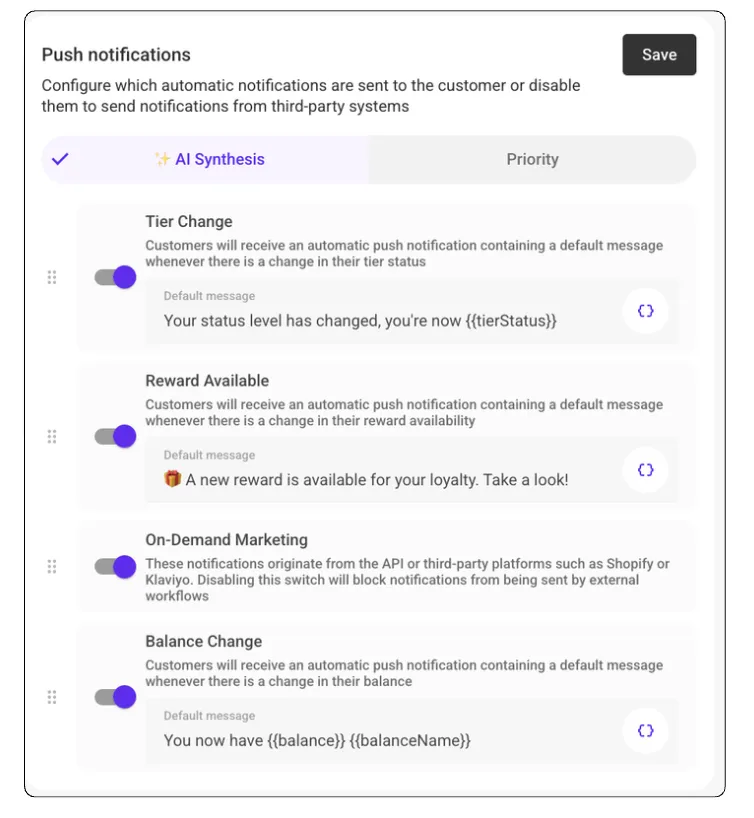
Choose the mode that fits your brand. You can switch between AI Synthesis and Priority at any time.