When you connect your wallet pass with a loyalty program (such as LoyaltyLion or JeriCommerce's built-in loyalty), a set of automatic notifications are ready to go from day one. These cover the most common loyalty events, keeping your customers informed in real time.
All integrations come with pre-built notifications for:
- Points balance updates — When a customer earns or redeems points
- Tier changes — When a customer moves up or down a VIP tier
- Reward unlocks — When a new reward becomes available
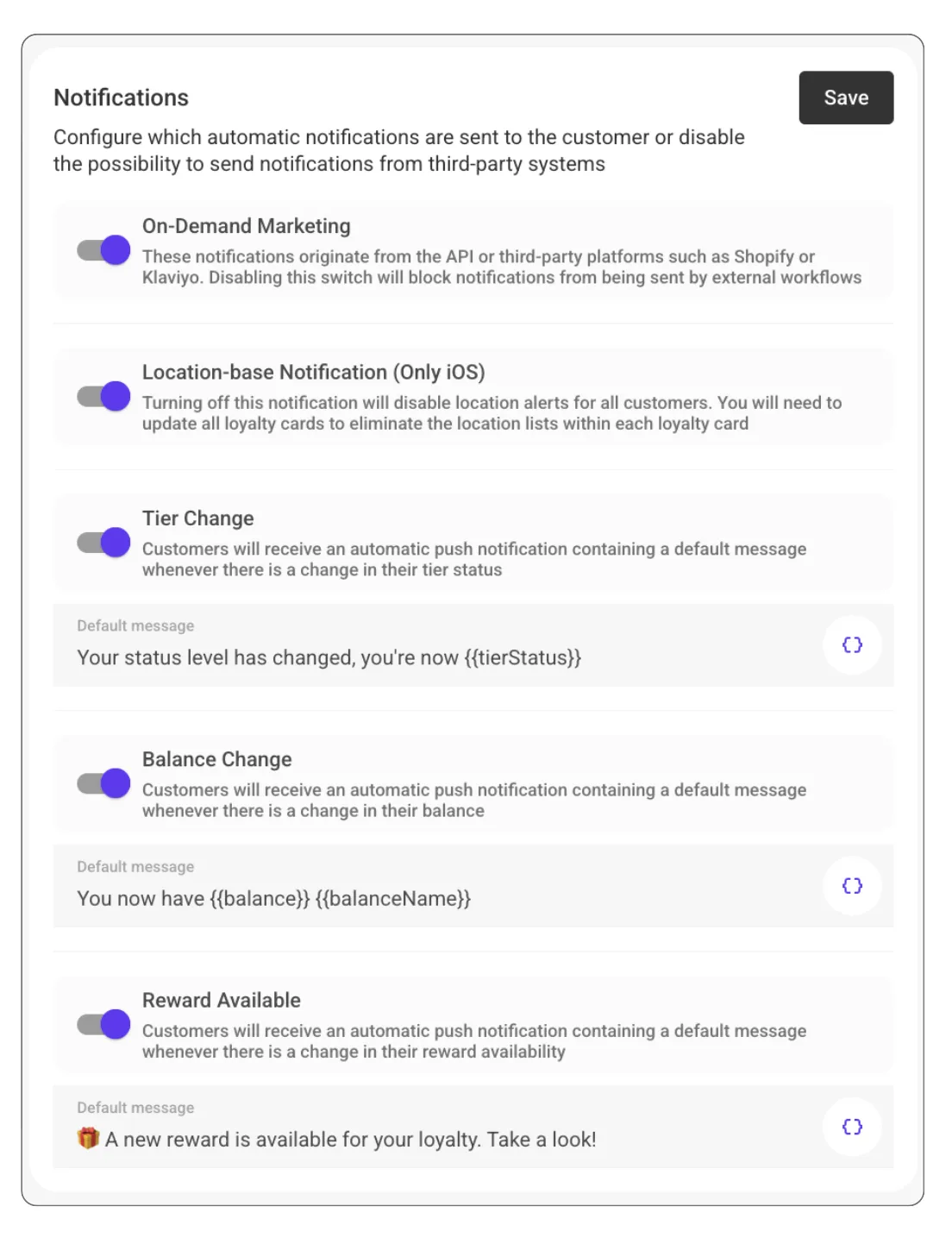
Customize Your Messages
You can manage automatic notifications from the admin by going to Settings > Customer Flows > Notifications.
From there you can:
- Edit the message text for each notification type
- Use variables to personalize messages (customer name, points balance, tier name, etc.)
- Translate the message into any language you've turned on, so each customer receives the notification in their own language
- Turn off tier or balance notifications if you prefer to handle them through other channels
Personalize your messages to match your brand's tone. A friendly "You just earned 50 points! 🎉" feels very different from a generic "Your balance has been updated."
Using Third-Party Channels Instead
If you prefer to send loyalty updates through Shopify Flows, Klaviyo, or the API instead of automatic wallet notifications, you can turn off the built-in notifications and trigger them from your preferred tool.
Check the Shopify Flows guide or Klaviyo push notifications guide for setup instructions. You can also use the Webhook Builder to generate a Klaviyo webhook in seconds.