This action adds points to a customer's balance or removes them. Use it when something outside JeriCommerce decides that a customer earned points, such as a review, a survey, or attending an event, or when you need to correct a balance.
For one-off changes you don't need an automation: use Update balance in the customer profile, described in Increase and Decrease Balance, or the options in Adjust Balance from Shopify. If customers can repeat the action that earns the points, a custom earning flow is a better fit, because it applies your limits and shows the action in their ways to earn.
What happens 
- The amount is always a positive number. You choose whether it adds or removes points, and you include a reason, which is saved with the change.
- The customer's balance and loyalty card update, and a Balance changed event is sent to your events webhook.
- When adding points, a boost campaign that applies to Manual / API points multiplies the amount. If your tier factor scope is Tier balance and points, the tier factor applies as well. So the points credited can be higher than the amount you send.
- With points-based VIP tiers, added points also count toward the customer's tier, and removed points are subtracted from it.
- The customer gets a wallet notification if balance notifications are turned on for the program and the customer.
A balance can't go below zero. If the customer has fewer points than the amount you remove, nothing is removed.
Set it up 
Use the JeriCommerce Balance increase and Balance decrease actions in any Shopify Flow workflow. Both work with the JeriCommerce loyalty program and with LoyaltyLion.
Add the action
In Shopify, open Flow, create or edit a workflow, and add Balance increase or Balance decrease after your trigger.
Fill in the fields
- Email: the customer's email. Use Add variable to pick it from the trigger.
- Amount: the number of points, always positive.
- Reason: why the balance changes.
Turn on the workflow
Save and turn on the workflow. The balance changes each time the trigger runs.
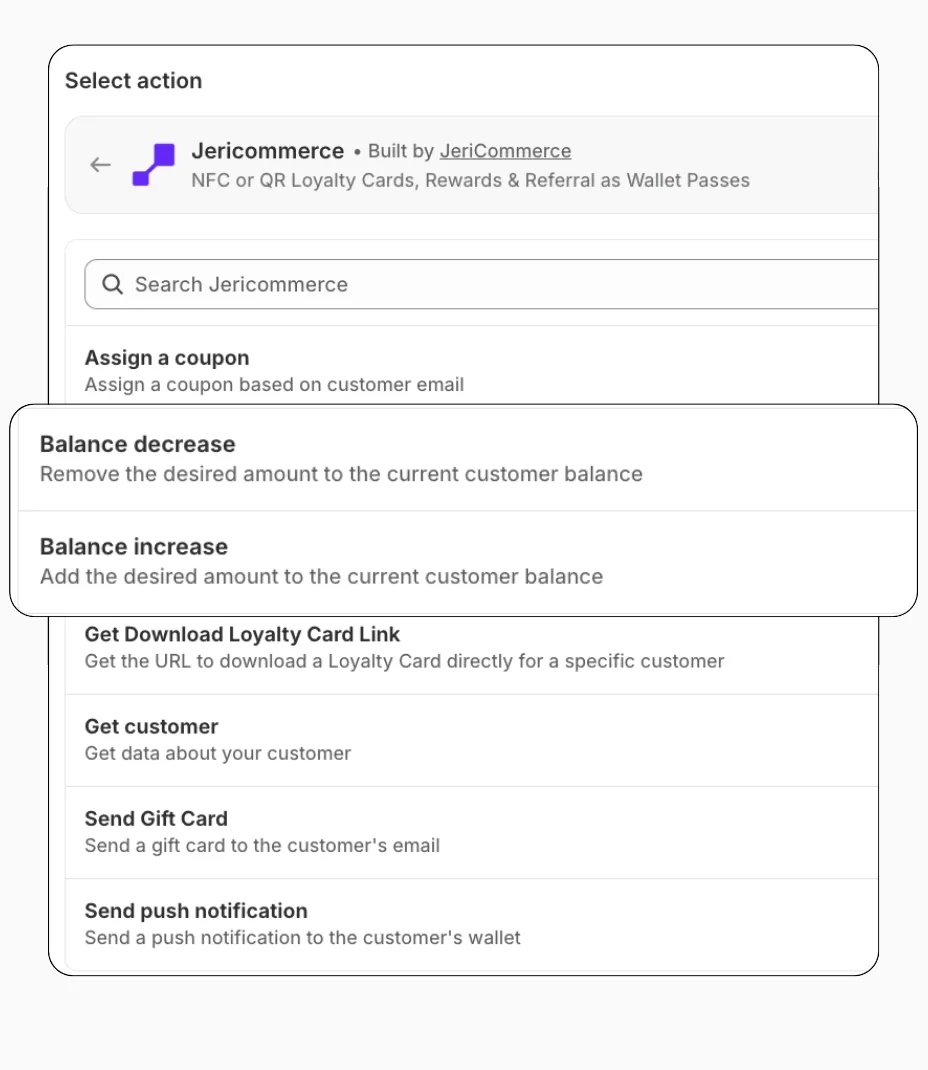
The change happens while the workflow runs. If it can't be applied, the step fails and the error appears in the workflow's run history. This happens when the email doesn't belong to a customer, the customer doesn't have a balance yet, or the customer doesn't have enough points to remove.
Add a Webhook action to your Klaviyo flow at the point where the balance should change. Choose whether to increase or decrease, fill in the builder, and copy each value into the webhook settings.
Choose an action
Your details
Find it in Settings > Technical > Program Information.
Create one in Settings > Technical > API Keys. It stays in your browser.
Action details
Copy and paste into Klaviyo
https://api.jericommerce.com/v1/programs/your-program-slug/balance/increaseapi-keyyour-api-key[
{
"email": "{{ person.email|default:'' }}",
"amount": 0,
"reason": ""
}
]You can use Klaviyo variables in the reason too, for example "Bonus for reviewing {{ event.product_name }}", so each change explains itself in the customer's history.
Klaviyo webhooks are queued: Klaviyo sends the request and JeriCommerce applies it a few seconds later. If the email doesn't belong to a customer, or there aren't enough points to remove, the change is skipped and Klaviyo is not told.
Some ideas for flows: a welcome bonus when someone joins your list, points for a product review, a win-back bonus for customers who haven't ordered in a while, or extra points on their birthday.
POST https://api.jericommerce.com/v1/programs/{program_slug}/balance/increase
POST https://api.jericommerce.com/v1/programs/{program_slug}/balance/decrease
Send your API key in the api-key header. See Authentication through the API. Both endpoints take an array of up to 100 items:
[
  {
    "email": "customer@example.com",
    "amount": 100,
    "reason": "Thanks for attending our launch event"
  }
]
| Field | Type | Required | Notes |
|---|---|---|---|
email |
string | Yes | Email of a customer already in the program. |
amount |
number | Yes | Points to add or remove, as a whole number greater than 0. |
reason |
string | Yes | Why the balance changes. Saved with the change. |
The API answers 201 with an empty body as soon as the request is valid, and applies the change a few seconds later. See queued endpoints. Customers who don't exist are skipped, and so are decreases larger than the balance. Neither is reported, so check the result with Get customer details if you need to be sure. A customer who exists but has no balance yet starts from 0.
| Code | Status | Meaning |
|---|---|---|
MAX_ITEMS_PER_REQUEST_EXCEEDED |
400 |
The array has more than 100 items. |
| Validation errors | 400 |
A field is missing, amount is not a positive number, or reason is empty. |
Build a ready-to-run request with your own values:
Choose an action
Your details
Find it in Settings > Technical > Program Information.
Create one in Settings > Technical > API Keys. It stays in your browser.
Action details
Your request
curl --request POST \
  --url 'https://api.jericommerce.com/v1/programs/your-program-slug/balance/increase' \
  --header 'api-key: your-api-key' \
  --header 'Content-Type: application/json' \
  --data '[
  {
    "email": "customer@example.com",
    "amount": 0,
    "reason": ""
  }
]'
Paste it in a terminal to test the request with your program.