This action runs one of your custom earning flows for a customer and gives them its points. Use it when something that happens outside JeriCommerce should earn points, like a published product review, a survey response, or attending an event.
Before you start, set up the custom earning flow in JeriCommerce with the Tap and external trigger or External trigger only mode, and note its slot: CUSTOM_1 to CUSTOM_5.
What happens 
- The customer gets the points you set in the flow, and the flow shows as earned in their Customer App.
- The flow's recurrence and maximum executions apply, so triggering it twice can't give the points twice when the limit is one.
- Boost campaigns that apply to custom earning flows multiply the points.
- A Balance changed event is sent to your events webhook.
Nothing is credited when the flow is turned off, isn't fully set up, isn't a custom flow, or the customer has reached its limit.
Set it up 
Use the JeriCommerce Execute earning flow action in any Shopify Flow workflow.
Add the action
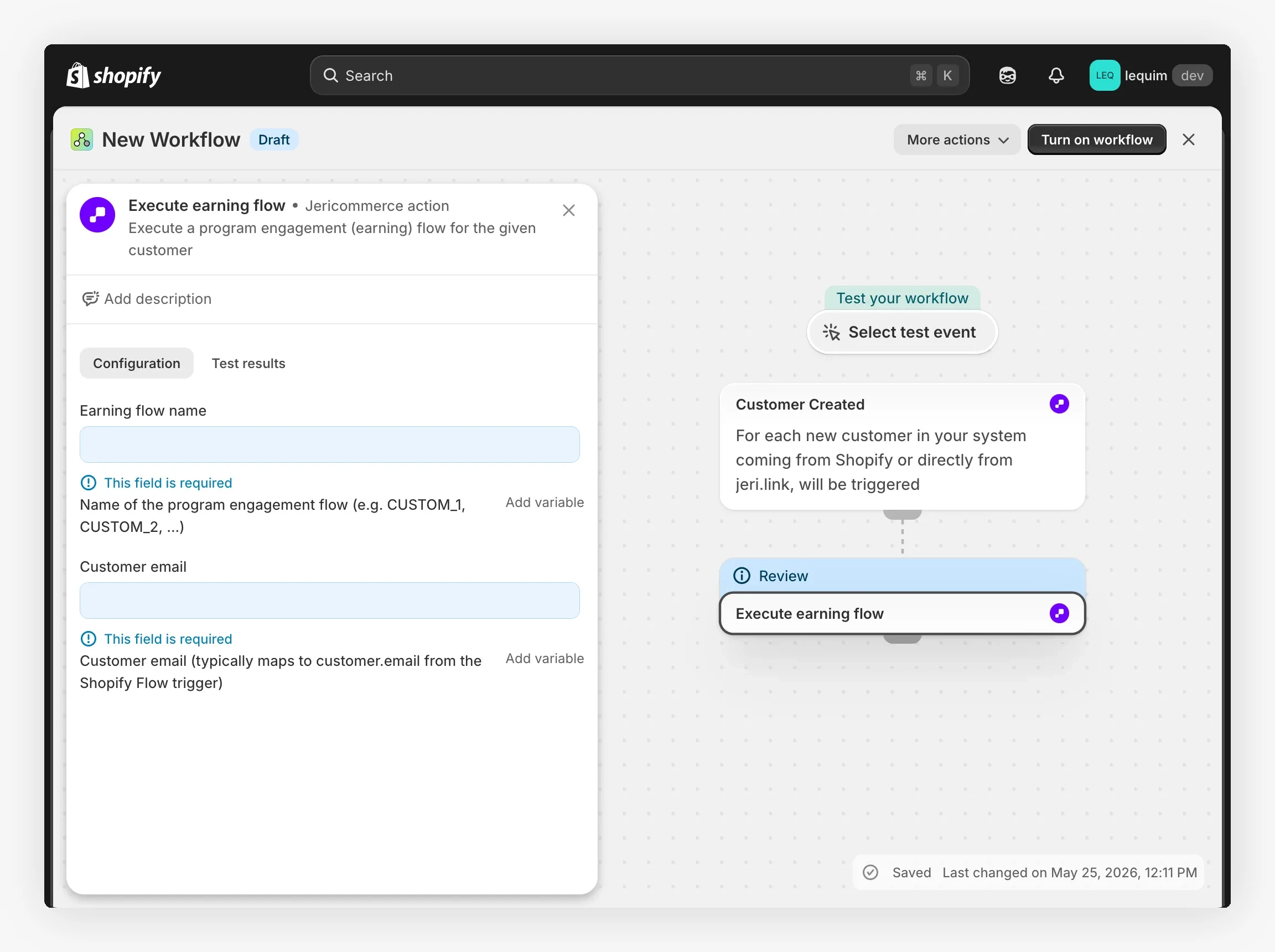
In Shopify, open Flow, create or edit a workflow, and add Execute earning flow after your trigger.
Fill in the fields
- Earning flow name: the slot of your custom earning flow, such as
CUSTOM_1. - Customer email: the customer's email. Use Add variable to pick it from the trigger.
Turn on the workflow
Save and turn on the workflow. The points are credited each time the trigger runs, within the flow's limits.
The flow runs while the workflow runs. If it can't be executed, for example because the customer reached the limit, the step fails and the reason appears in the workflow's run history.
Add a Webhook action to your Klaviyo flow. Fill in the builder below and copy each value into the webhook settings.
Your details
Find it in Settings > Technical > Program Information.
Create one in Settings > Technical > API Keys. It stays in your browser.
Action details
The slot of the custom earning flow, from CUSTOM_1 to CUSTOM_5. Open the flow in JeriCommerce to see it.
Copy and paste into Klaviyo
https://api.jericommerce.com/v1/programs/your-program-slug/custom-earning-flows/CUSTOM_1/executeapi-keyyour-api-key{
"customerEmail": "{{ person.email|default:'' }}"
}Klaviyo sends the request and doesn't read the answer. If the customer has reached the flow's limit, nothing is credited and Klaviyo is not told.
POST https://api.jericommerce.com/v1/programs/{program_slug}/custom-earning-flows/{earningFlowId}/execute
Replace {earningFlowId} with the slot of the flow (CUSTOM_1 to CUSTOM_5). You can also use the flow's internal ID, but the slot is easier because it stays the same if you reset the flow.
This endpoint accepts two kinds of authentication:
- API key in the
api-keyheader, from your server. It can run the flow for any customer, so the body must include the customer's email. See Authentication through the API. - Customer token in the
Authorization: Bearerheader, from the customer's own browser or app, such as a custom storefront. The flow runs for that customer and the body can be empty. Create the token withtoken_type=authas described in Customer Tokens.
{
  "customerEmail": "customer@example.com"
}
| Field | Type | Required | Notes |
|---|---|---|---|
customerEmail |
string | With an API key | Email of a customer already in the program. Ignored with a customer token. |
Unlike the other actions, this endpoint runs immediately and answers 200 with the result:
{
  "pointsAwarded": 100,
  "remainingExecutions": 0,
  "recurrence": "once"
}
| Field | Notes |
|---|---|
pointsAwarded |
The points credited in this execution. |
remainingExecutions |
How many more times this customer can run the flow in the current period. 0 means they reached the limit. |
recurrence |
The flow's period: once, daily, weekly, monthly, quarterly, semiannually, or yearly. |
| Code | Meaning |
|---|---|
CUSTOMER_EMAIL_REQUIRED |
You used an API key without customerEmail in the body. |
EARNING_FLOW_NOT_FOUND |
The earningFlowId does not exist in this program. |
NOT_A_CUSTOM_EARNING_FLOW |
The ID points to a standard flow, such as purchases, which can't be triggered this way. |
EARNING_FLOW_INACTIVE |
The flow exists but is turned off. |
EARNING_FLOW_NOT_CONFIGURED |
The flow is missing its points, recurrence, or maximum executions. Open it in JeriCommerce and save it. |
CUSTOMER_NOT_FOUND |
No customer with that email exists in the program. |
MAX_EXECUTIONS_REACHED |
The customer already ran the flow the maximum number of times in the current period. |
Build a ready-to-run request with your own values:
Your details
Find it in Settings > Technical > Program Information.
Create one in Settings > Technical > API Keys. It stays in your browser.
Action details
The slot of the custom earning flow, from CUSTOM_1 to CUSTOM_5. Open the flow in JeriCommerce to see it.
Your request
curl --request POST \
  --url 'https://api.jericommerce.com/v1/programs/your-program-slug/custom-earning-flows/CUSTOM_1/execute' \
  --header 'api-key: your-api-key' \
  --header 'Content-Type: application/json' \
  --data '{
  "customerEmail": "customer@example.com"
}'
Paste it in a terminal to test the request with your program.