Give your customers the power to choose how they spend their points. Instead of assigning coupons for them, JeriCommerce's rewards system lets customers browse a catalog, pick the reward they want, and redeem it with their points.
Turn On Rewards
Go to Settings → Integrations → JeriCommerce and turn on the Rewards feature. Once active, the rewards option appears in the Loyalty submenu.
Set Up a Reward
When you create a reward, you'll see four sections:
Look & Feel
Set the title, image, and description that customers see in their rewards list. Title and description support multiple languages, with a language picker that appears in the editor once you have more than one language set up.
Redeem Cost
Define how many points the customer pays to claim this reward. The points are deducted from their balance when they redeem.
Setting the cost to 0 means the customer gets the reward without losing any points — useful for welcome rewards or free-tier perks.
Usage Conditions
Control who can see and redeem the reward:
- Visibility restrictions control whether a customer can see the reward. Set a balance range and use Who can see this reward to choose eligible JeriCommerce segments.
- Redeemability restrictions control whether a customer can claim the reward. Set the maximum redemptions, balance range, and Who can redeem this reward segments independently from visibility.
Both segment selectors default to Everyone. If you choose more than one segment, a customer only needs to belong to one of them.
This lets you keep a reward visible to everyone while reserving redemption for selected groups, such as VIP tiers or recently engaged customers. Customers who can see a reward but do not match its redemption segments see Not available for you. Customers outside its visibility segments do not see the reward.
The reward editor offers built-in JeriCommerce segments. Shopify and Klaviyo segments are not available for reward restrictions.
Associated Discount
Link a Shopify discount that gets claimed automatically each time a customer redeems this reward. The customer receives a unique code to use in your store. You can create a fixed amount, percentage, free shipping, or buy X get Y discount, and point it at your whole catalog or at selected products, as covered in the discounts guide.
You can also upload a CSV file with a batch of unique codes to distribute one per redemption.
Show Rewards to Customers
Add a link to any section of your loyalty card that opens the rewards page directly. Click the variables icon in the link field and choose Rewards Page.
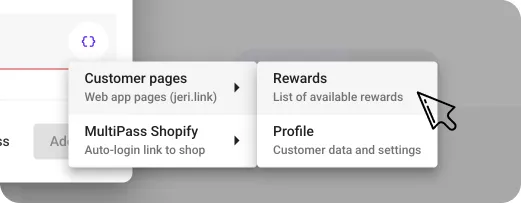
{{linkCustomerAppRewards}}) works in push notification links too — great for driving redemptions from campaigns.