How Customers Earn Tier Points
JeriCommerce calculates customer tier progression based on one of two methods, depending on how your loyalty program is configured: based on currency spent or based on loyalty points earned. The system then automatically assigns the customer to the highest tier for which they meet the minimum required points.
Method 1: Based on Currency Spent
When your program uses currency-based tier calculation, the tier points are calculated as follows:
-
Every purchase from your Shopify store is automatically tracked.
-
The total amount spent (in your program's currency) counts toward tier points.
-
Returns and refunds subtract from tier points.
-
Currency conversion is handled automatically for international orders.
Example: A customer spends $150 and earns 150 tier points. If they return a $50 item, they lose 50 tier points, resulting in a net tier balance of 100.
Method 2: Based on Loyalty Points
When your program uses points-based tier calculation, the tier points are affected by loyalty point activity:
-
Points added through purchases, bonuses, or promotions count toward tiers.
-
Every time customers earn or lose loyalty points, it affects their tier.
-
Crucial Rule: Points removed for reward redemptions do not affect tier status. Customers do not lose tier progress when redeeming rewards.
-
Point loss due to expiration will decrease tier points.
Example: A customer earns 500 points from a purchase (tier points increase by 500). If the customer redeems 200 points for a reward, their tier points stay the same (no change).
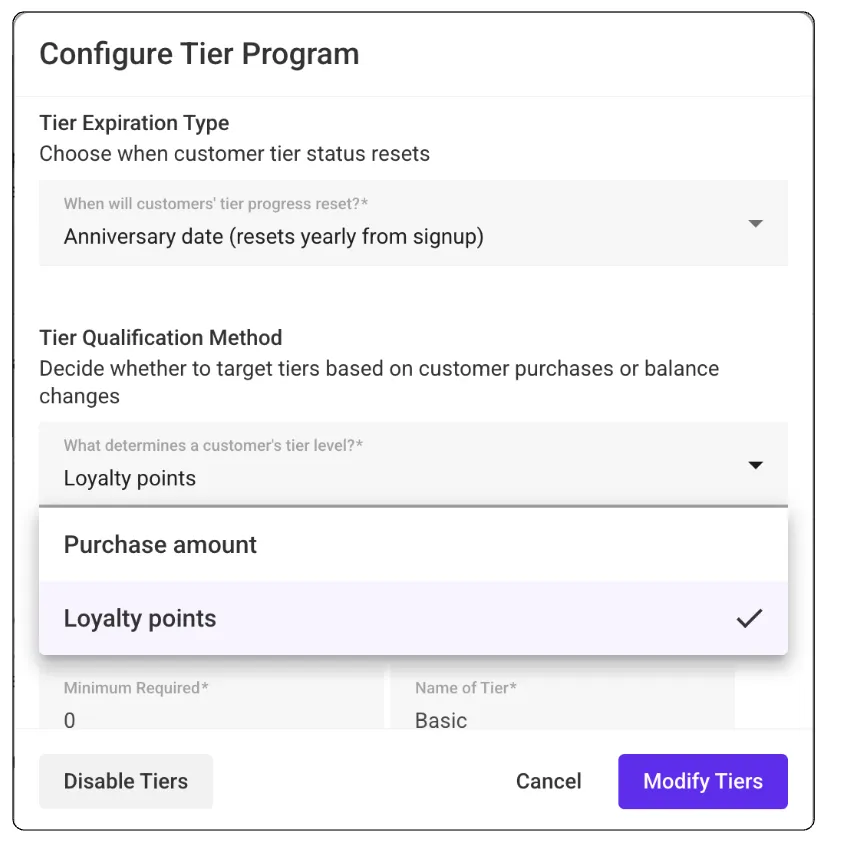 JeriCommerce > Settings > Loyalty > Tiers > Edit
How Tier Levels Are Determined
JeriCommerce automatically assigns customers to the appropriate tier based on their current tier points.
The Rule: Customers are placed in the highest tier for which they meet the minimum required points.
Tier Selection Logic
-
The system looks at all your tiers, sorted by required points (highest to lowest)
-
It finds the first tier where requiredPoints ≤ customer's current tier points
-
If no tier matches, the customer is assigned to your base tier (lowest tier
Example Calculation
Your Tiers:
Bronze: 0 points
Silver: 1,000 points
Gold: 5,000 points
Tier Setup Requirement Customer Scenario (Points) Assigned Tier Logic
Bronze 0 points 500 points Bronze 500 < 1,000 (Silver requirement)
Silver 1,000 points 2,500 points Silver 2,500 ≥ 1,000 but 2,500 < 5,000 (Gold requirement)
Gold 5,000 points 7,000 points Gold 7,000 ≥ 5,000
Next Guide: To understand how these tier points lead to instant status changes and customer alerts, please see ** Real-Time Updates and Customer Notifications**.